Showing posts with label Android. Show all posts

Wii Games Now on Android Devices Thanks to a Clever Hack


Want to play Wii games on your Android tablet? Well, one man has figured out how to play Wii games on his Android tablet. We aren’t sure why, but the deed is done.

Using the Splashtop Remote Desktop App, which remotely connects and allows you to access your computer via VNC, a Dolphin Emulator, and a wireless Xbox 360 controller, Obiwan222222 got the job done.
Click to View Embedded Video Clip

Wii Games Now on Android Devices Thanks to a Clever Hack
Of course there is no Wiimote needed to play these games on Android devices. So what else did he do to make this work? Well he connected the wireless remote to his ASUS Eee Pad Transformer’s keyboard dock, used the Dolphin Emulator to run the Wii, then he used the Splashtop Remote Desktop App to connect to the device running the Dolphin emulator. It’s all pretty straightforward. Why didn’t I think of this first? Probably because I’d rather play PS3 and Xbox 360 games. He did a fantastic job though
[via nexus404]

Droid Bionic hands-on Favorite


About This Video

This video is Public
Hands-on with the Motorola Droid Bionic

Android in spaaaace! (Part 2)

Back in December, Android ventured into near space, thanks to a weekend of DIY work, a couple of Nexus S phones, some weather balloons and the help of this little guy. After this first adventure, we knew it was only a matter of time before Android went further into space.

On the last manned space shuttle, Atlantis, NASA sent two Nexus S phones along for the ride as part of the STS-135 mission. The goal is to use Nexus S on the International Space Station to explore how robots can help humans experiment and live in space more efficiently.


NASA is using Nexus S phones to upgrade a trio of volleyball-sized SPHERES (Synchronized Position Hold, Engage, Reorient, Experimental Satellites), originally developed by MIT. The phones help the robotic satellites perform tasks the astronauts used to do, like recording sensor data and capturing video footage. In the future, the phones will control and maneuver the SPHERES using the IOIO board and possibly the Android Open Accessory Development Kit (ADK).

A couple of our engineers built an open source sensor logging app that NASA decided was perfect for running diagnostics with the SPHERES. You can download the same app yourself from Android Market. NASA was interested in Android because it’s an open source platform, which makes it easy to customize the software on the phone to meet the specifications required to fly in space and work with the SPHERES. Nexus S was also a good fit because of its various sensors and low-powered, but high-performing, processor.

You can learn more about the project on NASA’s website. We loved being a part of the final Space Shuttle mission and working to bring the power of the Android platform to space exploration.
Via Android in spaaaace! (Part 2)

Free Android Apps for Everyday Use

It can be difficult to stay organized nowadays. We demand so much of ourselves, in fact, that we often just go with the flow and have little control over our own lives. However, this is the beauty of modern technology. With the advent of smartphones comes a revolutionary way for all of us to keep our lives organized. Check out these free Android apps that will help you keep your life in line.

1. Reverse Lookup by eMobile

When solicitors and telemarketers get a hold of your phone number, their calls are nothing short of annoying, mainly because they always call you at the worst times. With this reverse phone lookup app, you can track the number of the person calling you down to their location, then block the number from ever calling your phone again.

2. Out of Milk by Capigami

This useful little app allows you to get rid of using paper lists and organizes your tasks, shopping needs and current food supply into one easy-to-use app.


The first function of Out of Milk is the task list. It's simple; you type in a task, then tap it to mark it off when finished. You can even manage multiple task lists, if you're one of those people who has more than one.

The second function is the pantry list. You can keep track of what food items you have in your pantry, simply by typing them in or using the integrated barcode scanner.

The third function, the shopping list, works the same way. You can either type in or scan the items you have on your shopping list, then do the same to mark them off. If you're planning a party that requires a specific shopping list, you can create a new list to match all of your shopping needs. Out of Milk will also keep a running total of the items you grab; all you have to do is scan each item.

3. TripIt


The TripIt app will organize your travel itinerary into one user friendly app. We often juggle paper itineraries along with our tickets and passports and can get even more frustrated than traveling already makes us. This free app will keep your itinerary in the palm of your hand. If you use Google Mail, TripIt will also sync with your email account to automatically generate flight itineraries for you.

4. Bump


Bump has made file sharing easier than ever. If you're tired of writing down someone's contact information, or even taking the time to type their number into your phone, Bump has allowed that to be easier and more time-efficient as well. All you need is two phones with the app open, then files and contact information can be shared simply by bumping the two phones together.

5. My Cars


With My Cars, you can keep track of your car's progress, and when you need to seek maintenance. All you have to do is plug in your car's information, and your mileage each time you fill up your tank. My Cars will automatically generate statistical information about whether you are getting the most out of your car each time you fill your tank. You can even manage multiple vehicles in this one app.

If you are ready to get your life organized, check out these and other free and useful apps on the Android market.
Via Free Android Apps for Everyday Use

Apps, Apps, & More Apps; An Infographic Look at Mobile Applications


Mobile apps are more popular than ever with individual apps boasting download counts in the millions and application sales breaking into the billions of dollars; take a peek at the phenomenon with this app-focused infographic.
What does the app market look like? Hundreds of thousands of applications across multiple markets and billions of dollars in sales. Apple’s App Store, for example, contains 225,000 apps that have been downloaded over 4 billion times and have generated 3 billion in revenue for app developers. Hit up the link below for additional stats on the Android Market, Windows Mobile Marketplace, and other app stores.
Look At All Those Apps! [Daily Infographic]

Developer: Troubled Times Ahead for Anyone Who Roots


I read a troubling thread over at MyDroidWorld this weekend from famed community developer P3Droid. His report spoke of an industry-wide movement to crack down on users who root their devices. Yes, tethering your data is a violation of your contract and any carrier has the right to shut you down and make you pay for that right. But it’s more than just “illegal” use of data if he’s to be believed.
Starting with the locked bootloader trkend that seems to be taking off, it seemed Motorola was the only manufacturer keen on locking their devices down for one reason or another, but P3Droid says that isn’t the case. (We know HTC’s newer line of phones implement newer, tougher security.) It’s a mix of carriers, OEMs, and Google themselves working together to find ways to better “protect” users. This means implementing security features that circumvents common exploits used to gain root access.
The end result is supposed to ensure that no malicious applications can steal a user’s data. (Something that has actually become a reality as of late.) That’s noble, but the next bit of information is what really worries me – carriers and OEMs are supposedly beginning to implement tracking applications that will allow them to know who’s on a rooted phone and carrying out actions such as unauthorized tethering. He reports that there are several different methods they implement.
They can simply see which MEID numbers refuse over the air updates. It’s common for custom ROM developers to disable that functionality to ensure the users of those ROMs aren’t interrupted. (And to make sure any OTA doesn’t somehow brick their phones.) Verizon seemed to be the first, but he reports that all major carriers have expressed their interest in it and are pleased with how well it works. It’s not yet known which devices carry this tracking application, if any at all.
“So why don’t developers just remove that tracking application?” That’s a good question, but a horrible answer is to follow – your phone would no longer be able to operate on the network via voice or data. And if the carriers don’t want to go to such extremes, they could simply just throttle your data speeds – Verizon reportedly successfully tested this on several devices that met the conditions.
None of this is confirmed, but P3Droid is a name that we trust after all he’s done for the development community. None of this is 100% going down for now, but just the thought of it is quite unsettling. If true, we hope Google and its partners reconsider such practices and come up with better ways to protect the users who they claim they’re protecting. (It really sounds like they’re just intending to punish the users that they can’t trust with their chain-free devices.) What are your thoughts on all of this? [MyDroidWorld via AndroidForums, Thanks to everyone who sent this in!]

Here’s a Full List of Unity3D Games for Android

This image has no alt text

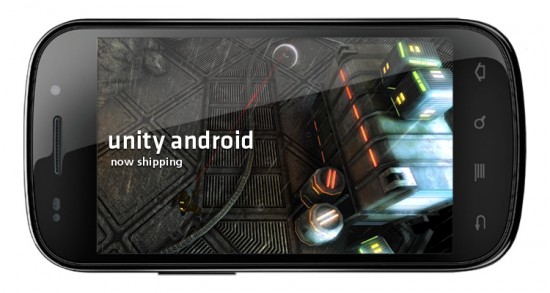
Following the release of Unity3D’s SDK for Android, many titles have been ported over from iOS or have been released from the ground up for Android. A ton of these titles offer quality gaming experiences, but it’s not exactly a walk in the park to find them. The folks at Unity have compiled a list of titles developed using their engine that is now available for Android, though. You may not be interested in every single one of them, but it’s worth taking a look through all of them – you’re sure to find a gem or two. Find the full list below courtesy of Droid Gamers.

Unity3D developer games for Android:

  1. Optathlon for United Airlines by Matmi
  2. Castle Warriors by GameResort
  3. Doodle Bowling by GameResort
  4. Zombie Defense by Dromedary
  5. Some slider puzzles by Decane
  6. Dogfight Lite for Android by Joaquin Grech (+ Dogfight)
  7. BATTLE BEARS: Zombies! by SkyVu Pictures
  8. Paper Football 3D for Android by JIRBO Games
  9. Zombies vs Catgirls by Randy Flood
  10. Bead Trail by Paul Schreiber
  11. The Great Ball Drop by Swift Creek Games LLC
  12. Skee Hoops by Hairy Monster Studios
  13. Beer Pong Classic by Corey Ledin LLC
  14. Lame Castle by Be-Rad Entertainment
  15. Catch a Ghost by Paul Schreiber
  16. Abduction by Nanogamo
  17. Crash For Cash by Midnight Status
  18. BowQuest: PandaMania! by FizzPow Games
  19. Cows Don’t Fly by HyperBees Ltd.
  20. Penguin X Run by Root9
  21. Phoenix Spirit by Spearhead Entertainment
  22. Polarity by Little Buddy Entertainment
  23. Ragna Rock by Gamevial
  24. Drink It! by Z3D
  25. Splode by Escalation Studios LLC
  26. Food Fight! Children’s Book by Jelly Biscuits
  27. Mana Chronicles by Spearhead Entertainment
  28. Downhill Bowling 2 by GameResort
  29. Drift Mania Championship by Ratrod Studio Inc.
  30. Douglas Fur’s Call of the Wild by Blue Diesel LLC
  31. Can Knockdown by Infinite Dreams
  32. Plasma Lamp by Infinite Dreams
  33. Rocket Bunnies by Defiant Development
  34. Crazy Snowboard by Ezone.com
  35. UFO Puzzle Attack! by David Gutierrez Palma
  36. Pebble by Gamevial
  37. Road Rage Lite by Gamevial
  38. Draw3D Lite by Gamevial
  39. Army Ranger Challenge by The Game Agency
  40. Bed Intruder The Game by Mighty Rabbit Studios, Inc.
  41. Memory Block and Memory Block Pro by Category 5 Games
  42. Topple Towers by Ian Stanbridge
  43. Vertigo Towers JoshOClock
  44. Breakout Kings by The Game Agency
  45. Stupid Zombies by GameResort
  46. Zombie Room AR by No, You Shut Up Games
  47. Holmenkollen Ski Jump by Agens AS
  48. Samurai II: Vengeance by MADFINGER Games
  49. Qbism HD Blowfish Studios Ltd
  50. Dr Nano X – will be available at Amazon Android App Store
  51. Miku, the videogame by Albert Devesa Triscon
  52. Cordy by SilverTree Media
  53. AirAttack HD Lite Art In Games
  54. Doodle Monster RVW games
  55. Stellar Escape by Orange Agenda
  56. Hungry MonstR by Blowfish Studios Ltd

Android Market for the Web

"Google has finally released the Web-based version of the Android Market, which is now available at market.android.com. You can link to applications, find apps from your computer and install them over the air.

Android Market for the Web includes all the applications, not just the ones that are available for a certain device or a certain version of Android, so it's much more comprehensive than the application that's installed on your Android device. You'll be able to find paid apps even if you live in a country where you can only install free apps and you'll be able to find apps that require Froyo even if your phone still uses Android Donut. In fact, you don't even have to be an Android user to explore the Market.

I've tried to install an application from the web site, but Google shows an 'invalid request' error after the authentication process.


To make the Market even better, Google announced two additional features that will be available soon: in-app purchases and fixed pricing for various currencies. That means you'll see less apps that cost $1.73 or €2.26, assuming that developers will adjust their prices.

uTorrent Android app manages torrents, pushes downloads to your device

"We've played with some good remote torrenting apps in the past, but now, at long last, the most popular desktop torrent client has a companion app as well. uTorrent Remote for Android is available for download from the Android Market, and it's one of the slickest mobile torrent apps we've seen.


With uTorrent Remote you can fully manage your uTorrent desktop client: add and remove downloads, pause transfers, and check your RSS feeds for new downloads. Once a torrent finishes downloading, you can even push the completed files to your device for mobile viewing. It's incredibly simple to set up, too. Just set up some login details in Options > Preferences > Web, and then use the same username and password on your device. There's no need to fuss with your router or firewall, either -- uTorrent takes care of negotiating the connection on its own.


On your desktop, you'll need to download the uTorrent 3.0 beta (currently Windows only). Android 2.1 is required on your device to run Remote.


Download uTorrent Remote for Android [QR code after the break]

Use Chrome? Love Android? Look Here.

This image has no alt text

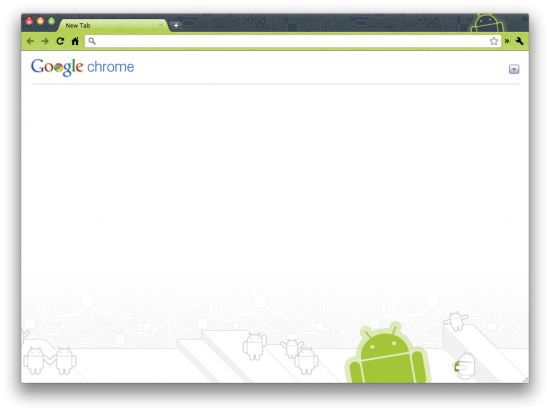
If you’ve got all your gadgets Googled out, chances are you’re rockin’ an Android Phone and browsing the web with Google Chrome. Some of you may not know that your Android obsession can transcend mobile and land directly on your browser… and in your GMAIL! The folks over at ChromeSpot are helping you get your Android on within the confines of Chrome.

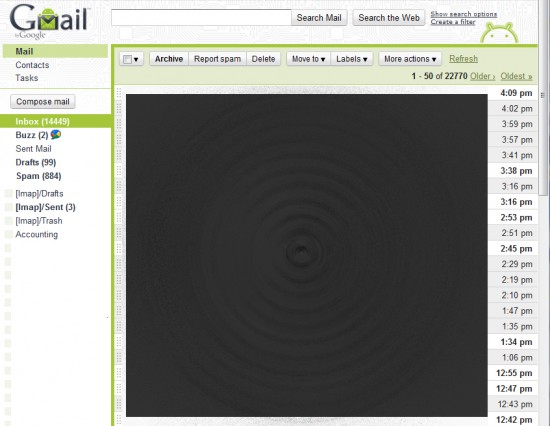
If you want to go for pure aesthetics, look no further than Android Theme for Chrome and the Android Theme for GMail. Not only will your browser tabs be ballin’ Android-style, but your inbox will be infiltrated by the little bugger as well:


Yes, that is correct… I have 14,000+ unread E-Mail messages, so when I don’t respond to you instantly, now you know why. I’ve deleted all the subject/senders as you can see, but I’m now realizing that this Black Hole of E-Mail is a realistic symbol of reality.

Other Extensions ChromeSpot recommends for Android Enthusiasts include Chrome To Phone, Android Market Link Converter, SpringPad for Chrome, and LastPass for Chrome. Head on over to their article titled Chrome Extensions for Android Fans for the full list. We’d like to tack on an additional extension sent in to Phandroid by a reader just hours ago: the Phandroid Chrome Extension.


The Phandroid Chrome Extension only does one tiny little thing but it does it very well – it links directly to Phandroid from your browser bar for easy access. I have one main question… why would anyone need this? I mean, everyone keeps at least one Chrome Tab open with Phandroid in it 24/7 right?

If you’re doing anything interesting that mixes Android with Chrome Extensions, please share with us all in the comments!

[Thanks Jared!]

Facebook Update Adds Deals, But Where Are They?

This image has no alt text


UPDATE: Commentor Vrusabh suggests to click on places to check in and nearby places offering facebook deals will show a yellow icon next to to their name. I guess nobody near me is offering any FB deals!


UPDATE 2: AHA! I found a deal! “Patterson Perk” has a deal offering 50% off any Specialty Latte if you check-in 3 times!


Check out Android Market and you’ll notice that Facebook has an update available for download. The main inclusion in version 1.5.1 seems to be the inclusion of “Deals” but I couldn’t seem to find them anywhere on the apps interface. Perhaps they’ve added support for deals but haven’t yet integrated them. Or maybe you need an available deal in your local area to actually receive a notification.


Immediate Android Market comments reflect mixed opinions on the update. Complaints of poor notifications, messed up Groups, and other shortcomings are abundant, but then again we’ve come to accept that negative experiences are more inclined to attract comments – plenty of others have said they like the update.


Also noted in the recent changes to this version are Facebook Chat and Push Notifications, but unless I’m mistaken, these have both been available for the past several version. Keeping them in the recent changes is probably just a reminder for others to get a move on and upgrade their app.


Download the update and let us know how you like it. And if you spot those “Deals” be sure you let us know in the comments!


[Thanks Leo!]

Triple Display Concept Phone is Cool, but One I Don’t See Taking Off [Video]


The latest in crazy, whacky concepts is pretty neat – a triple display phone that’s running Android and can fold and bend for different uses. It can be transformed from your traditional slate up to a pyramid of sorts to give you a blocky space-age looking device. And this concept is said to include a full QWERTY keyboard somewhere, but I’m not sure exactly how one would access it.


It’s not that I wouldn’t want something like this to take off – I’m all for the theme that seems to have taken 2011 by storm, innovation – but is this practical enough to be picked up by an R&D firm? I don’t think so. At least not for the foreseeable future. For now, it’s something cool to look at. You can do just that by hitting the play button below. [via Engadget]

ANDROID

demotivational posters - ANDROID

ANDROID

An Apple a Day Keeps the Doctor away

T-Mobile intros DriveSmart Plus service to block texting while driving, FamilyWhere to track down your kids

The texting-while-driving epidemic is starting to get a lot of carrier attention, and T-Mobile's taking it to the next level today by throwing its weight behind a new subscription-based upgrade to the DriveSmart app that's been available on the LG Optimus T since launch. DriveSmart Plus runs $4.99 a month for all lines on your account (provided the lines are attached to compatible devices) and upgrades the basic DriveSmart app by automatically detecting when your car's in motion -- no need to enable it by hand -- at which point incoming calls are automatically sent to voicemail and incoming text messages are met with an automatic response that the recipient is currently driving. Naturally, there's an emergency override built-in -- but to make sure young drivers aren't abusing it, DriveSmart offers parents the option of being contacted by text or email when it's overridden and can let them monitor overall phone usage through a web interface. The service is only available on the Optimus T initially, but more hardware support is "coming soon."

On a related note, T-Mobile is also introducing FamilyWhere, matching similar services already offered by Verizon, AT&T, and Sprint by letting parents see where their young'uns are and set up customized alerts by location and time; it's apparently compatible with "nearly any type" of phone on the T-Mobile network, so you shouldn't need to equip the tykes with superphones just to get this action set up. It runs $9.99 a month and covers all the lines on your account; follow the break for both press releases.

Acer building Sandy Bridge tablets for Android, will use them to 'phase out' netbooks

You'd be forgiven for expecting that the dual-core Tegra 2 that swept all before it at CES would be the king of tablet processors for a good while, but Acer is already plotting ways to overthrow it. Admittedly, Acer is kind of cheating by jumping into x86 land and snatching some unspecified Intel Sandy Bridge silicon, but are you really going to complain about getting multi-core grunt under the hood of your well-lubricated Android machine? An official from the company has promised two to three new tablets, sized at either 7 or 10 inches diagonally, for the first half of this year -- a tasty morsel of information, which he garnishes with the forecast that netbooks will eventually be phased out in favor of such touchy-feely slate devices. If you can fit a full second-gen Core CPU inside a tablet, why the heck not?

CyanogenMod 7 Gingerbread nightlies pushing now!

CyanogenMod 7 - Gingerbread
For those of you waiting to get your hands on CyanogenMod 7 (aka Gingerbread), nightly builds have finally (we say that with a smile) started up for the phones supported by the community project. Builds are ... erm ... building as we speak, and we've already got it up and running on our Nexus One.
As is case with these nightly builds, bugs are inevitable. So no complaining about that to the folks in charge, eh? Get your download on in Rom Manager or at the Cyanogen forums, and you'll need to flash new gapps (99 percent of us will want the Universal DPI: Tiny version) with this nightly. Enjoy! [Cyanogen, gapps]
CyanogenMod 7 Gingerbread nightlies pushing now! posted originally by Android Central
Sponsored by Android Cases and Accessories

Evolve III Maestro slate triple-boots Android, MeeGo and Windows 7 (video)

Honeycomb: Android for Tablets

Honeycomb: Android for Tablets: "Google has accidentally made public a YouTube video that shows Android 3.0 in action. It's a completely new interface for tablets that borrows a lot of ideas from BumpTop, the 3D desktop software acquired by Google last year.


Engadget says that the new interface 'looks more or less nothing like Android'. You might think it's a new operating system. The video mentions that this is 'the next generation of Android' and that's built entirely for tablets.

Google has focused on improving the user interface and Android 3.0 comes with fluid home screens, better app switching, browser tabs, video chat, dynamic app shortcuts and new versions of Google's Android applications that take advantage of the bigger screen.

It seems that the Android tablets that will be launched in the coming months will have impressive hardware and an updated operating system that looks stunning, so they're poised for success.


Update: Google confirms the release of Android Honeycomb.
Honeycomb is the next version of the Android platform, designed from the ground up for devices with larger screen sizes, particularly tablets. We’ve spent a lot of time refining the user experience in Honeycomb, and we’ve developed a brand new, truly virtual and holographic user interface. Many of Android’s existing features will really shine on Honeycomb: refined multi-tasking, elegant notifications, access to over 100,000 apps on Android Market, home screen customization with a new 3D experience and redesigned widgets that are richer and more interactive. We’ve also made some powerful upgrades to the web browser, including tabbed browsing, form auto-fill, syncing with your Google Chrome bookmarks, and incognito mode for private browsing

Holy reverse KIRF Batman! Meizu M9 ROM ported to HTC EVO 4G

Some industrious hackers have created a port of the Meizu M9 ROM for the HTC EVO 4G, bringing a little KIRF flavor to Sprint's favorite jumbo phone. The port is still in the developmental stages, but most of the M9 functionality appears to already be working, with only the port from GSM to CDMA and tweaks to screen resolution left to do. After a little spit-shine to make sure the build is stable, EVO owners can finally see what the Meizu M9 fuss is all about without having to actually buy one. Of course, why you'd actually want to do this to your perfectly functional Android phone is a question that may never truly find a legitimate answer.

Via:Engadget
Ali Waqas
sourceMIUI-Developers, xda-developers

Alleged 3DS, PlayStation Phone disassembled

Not one but two ritualistic device dismantlings have been exacted in recent days, an alleged 3DS and PlayStation Phone the sacrificial lambs. Spilled across a TVGZone forum thread are the guts of an apparent 3DS, posted by a Taiwanese tinkerer who claims to have obtained the stolen unit (not unlike the one supposedly lifted from an assembly line earlier this month) and promptly taken the tools to it. The de-casing has revealed only a typical arrangement of circuitry and plastic bits, leaving us to wonder if the plundering of this poor portable was in vain.

As it we hadn't seen enough already, TGbus, which had apparently tired of displaying its alleged "Xperia Play" PlayStation phone alongside its comprehensive collection of the world's handheld devices, broke out a set of Torx bits and proceeded to tear the thing down. The meticulous disassembly, however, failed to uncover what some might have hoped would be an intact, teensy-weensy PlayStation system -- just more circuitry (including what's suspected to be a Qualcomm MSM7x30 chipset) and plastic bits, it seems.

Are you finished yet, you monsters?