
Showing posts with label Pc. Show all posts
Showing posts with label Pc. Show all posts
Rage: PC AMD Card Performance
Check out the performance of id Software's newest shooter game Rage running on a PC using ATI graphics tech.
IGN's YouTube is just a taste of our content! Check out our other game channels:
IGN Home - http://www.ign.com
Call of Duty - http://youtube.com/callofdutyign
Zelda - http://youtube.com/zeldaign
Battlefield - http://youtube.com/battlefieldign
Halo - http://youtube.com/haloign
Street Fighter - http://youtube.com/streetfighterign
IGN's YouTube is just a taste of our content! Check out our other game channels:
IGN Home - http://www.ign.com
Call of Duty - http://youtube.com/callofdutyign
Zelda - http://youtube.com/zeldaign
Battlefield - http://youtube.com/battlefieldign
Halo - http://youtube.com/haloign
Street Fighter - http://youtube.com/streetfighterign
Battlefield 3 - Ps3, Xbox 360 and PC Comparison
Uploaded by Robbaz on Sep 29, 2011
What is the best and what is the worst? This is beta though! Things will change. Like and Favorite!
Twitter - http://twitter.com/#!/RobbazTube
Homepage - http://www.robbaz.com
Twitter - http://twitter.com/#!/RobbazTube
Homepage - http://www.robbaz.com
Labels:
Battlefield 3,
Pc,
PS3,
Xbox 360,
Youtube

1920 unifed shaders Blackcomb? WTF is this shit?
long story short, some former AMD/Intel engineer.... in your usual Chinese forums.. managed to create a vbios that turns Blackcomb shaders into Hyperthreading capable virtual processors...effectively doubling the shaders! Does this even make sense? The 3dm11 scores ....assume no editing tricks....are off teh charts! If this works with Cayman desktop parts...bless oh my AMD! bye bye NGC...

New Razor Blade True Gaming Laptop with i7 Processor
Razor Blade Gaming Laptop
Price: $2800
Features:
*17-inch display
*8 GB RAM
*0.88 inch/2.24 cm thick
*Powered by Sandy bridge Intel i7 Processor and latest nVIDIA GPU with optimus
*Dynamic adaptive key technology
* Built-in touchscreen and buttons with LED displays
*Lightweight Design
Labels:
LapTop,
Pc,
Razor Blade,
Youtube
Razer unveils $2800 'Blade' laptop

The "Blade" uses the UI from Razer's "Switchblade" concept -- a set of ten adaptive keys and an LCD touchscreen built into the keyboard, which can be used either as a touchpad or to display in-game information.
What it doesn't use from the Switchblade is the compact form factor. This laptop has a 17" LED-lit screen and weighs around 7 pounds. That's light for a gaming laptop, but heavy for a thing you're carrying around. It packs a 2.8GHz Intel Core i7 processor, 8GB of RAM, a 320GB hard drive and an Nvidia GeForce GT 555M with 2GB of video memory.
All those big numbers bring another one: the Blade will retail for $2799.99 when it launches in North America in Q4 of this year.
30 Years of the PC: an Infographic Timeline
PC Mag is celebrating the PC’s third decade (and the 30th year of its own publication, too) with an illustrated history of the technology and magazine, including notable names, hardware and benchmarks along the way.

[PCMag] 30 Years of the PC: an Infographic Timeline
Follow along with our timeline as we point out a few of the important folks, products, and waystations in this journey through technology over the past 30 years. And if you’re suitably intrigued, we have an even more extensive timeline for you to check out.
[PCMag] 30 Years of the PC: an Infographic Timeline
Labels:
Pc

Building a PC, Part VII: Rebooting
I've had more or less the same PC, with various updates, since 2007. I've written about most of it here:
So I decided it was time to build myself a nice Sandy Bridge system. What I ended up with is easily the best case and motherboard combination I've ever laid hands on. Read on!
I cut out a lot of the initial research work by relying on my old, dear friends at Tech Report and their current workstation recommendations:

When it comes to power supplies, I'm crazy about efficiency, and fortunately there are now lots of so-called '80 Plus Gold' PSUs out there now, offering a staggering 90% efficiency under most loads. Power supply efficiency is important, because the rest of that heat is dumped back into your case. The less efficient your PSU, the more heat buildup you'll have under load. I chose the Seasonic X-760 – which, when bench tested, indeed delivered the promised 90% efficiency – but any high quality 80 Plus Gold model will generally do.
The CPU (and possibly, depending on your tastes, the video card) is the biggest heat generator inside your PC. The better and more efficient the CPU cooler, the quieter your whole system can be. This also affects how much you can overclock. I chose the Thermalright Venomous-X Silent Edition on the basis of it being the current top dog for efficiency, and because it had a simple mounting system. Large coolers can be a real bear to install. And did I mention it comes with an especially quiet fan out of the box, too?
Once I had all the parts in hand, it was a simple matter of building it up, as documented in my previous post series. I adore this Corsair case; it is an absolute joy to work in. Everything in it is cleverly designed, from the rear cable routing area with rubber grommets all over the place for easily passing cables back and forth, to the tool-less 2.5' and 3.5' bays, to the super easily removable side panels. It's like they read a giant list of all my prior complaints with every PC case I've ever used and fixed every. single. last. one of them.
The end result is what you see here:

There are some significant tweaks visible in the above picture that I do recommend:

(beware: there is one nasty little issue with the Asus motherboard's auto-overclock feature. The PLL Overvoltage setting, which auto-overclock 'helpfully' enables, completely bollixes up resuming from sleep. Just turn it off, and all is well. I don't even want to tell you how long it took me to figure that one out.)
The total package with a nice SSD delivers a near-perfect Windows Experience score:

I won't lie to you. This is not a compact build. It's big! Those roomy side areas come at a cost, and that makes it a very wide case. But that's to be expected for a desktop powerhouse machine. And since my last case lasted me from 2007-2011, I'll happily accept a little bulk for something that's easy to work on and upgrade over time.

It's a fantastic new reboot of my system, and I didn't expect to be this excited about the final result. This is not merely an incremental improvement over what I had, it's much quieter, easier to work on, and when overclocked to 4.4 GHz, noticeably faster too. (I do slightly mourn the loss of 8 GB of RAM, but I'll survive.)
In this build, I already had hard drives, DVD drive, a sound card, and so forth … but for completeness' sake I'll list everything here if you want to mirror this setup. Realize that some of this comes down to personal taste, so I'm just listing what I recommend. Feel free to change anything out, and bear in mind that Sandy Bridge has decent default onboard video as well.
Via Building a PC, Part VII: Rebooting
- Building a PC, Part I: Minimal boot
- Building a PC, Part II: Burn in
- Building a PC, Part III: Overclocking
- Building a PC, Part IV: Now It's Your Turn
- Building a PC, Part V: Upgrading
- Building a PC, Part VI: Rebuilding
So I decided it was time to build myself a nice Sandy Bridge system. What I ended up with is easily the best case and motherboard combination I've ever laid hands on. Read on!
I cut out a lot of the initial research work by relying on my old, dear friends at Tech Report and their current workstation recommendations:
- Asus P8Z68-V Pro $220
- Corsair Vengeance 16 GB kit $155
- Core i7-2600K $315
When it comes to power supplies, I'm crazy about efficiency, and fortunately there are now lots of so-called '80 Plus Gold' PSUs out there now, offering a staggering 90% efficiency under most loads. Power supply efficiency is important, because the rest of that heat is dumped back into your case. The less efficient your PSU, the more heat buildup you'll have under load. I chose the Seasonic X-760 – which, when bench tested, indeed delivered the promised 90% efficiency – but any high quality 80 Plus Gold model will generally do.
The CPU (and possibly, depending on your tastes, the video card) is the biggest heat generator inside your PC. The better and more efficient the CPU cooler, the quieter your whole system can be. This also affects how much you can overclock. I chose the Thermalright Venomous-X Silent Edition on the basis of it being the current top dog for efficiency, and because it had a simple mounting system. Large coolers can be a real bear to install. And did I mention it comes with an especially quiet fan out of the box, too?
Once I had all the parts in hand, it was a simple matter of building it up, as documented in my previous post series. I adore this Corsair case; it is an absolute joy to work in. Everything in it is cleverly designed, from the rear cable routing area with rubber grommets all over the place for easily passing cables back and forth, to the tool-less 2.5' and 3.5' bays, to the super easily removable side panels. It's like they read a giant list of all my prior complaints with every PC case I've ever used and fixed every. single. last. one of them.
The end result is what you see here:
There are some significant tweaks visible in the above picture that I do recommend:
- Use tin snips to remove the rear exhaust grill. We don't need it back there, and the exhaust airflow is critical. Fan grills affect low-speed fan airflow more than you'd think:
Wire grills also have an effect: ~20%. This was checked with an anemometer on several different fans of 80, 92 and 120mm size, at full and lower speeds. The airflow reduction went as high as 24% but it was never below 19%. At 12V, the reduction in airflow with most fans will be relatively harmless, though there is an increase in turbulence noise (audible to me). But at the low airflow rates SPCR members run fans, I think the airflow reduction is significant.
- Install a 140mm rear exhaust fan. The Noctua NF-P14 is expensive at $25 but is cleverly designed to give you 140mm of super-quiet fan in the space a 120mm fan would normally take. It just barely fits in the rear exhaust fan slot with a little nudging. But it does fit; it's the beige fan in the above picture. It also comes with its own speed reducers and accessories.
- Use fan speed reducers on all the fans. The case has two 200mm fans, and the 140mm fan we're adding. I couldn't get the Asus motherboard's 'QFan' fan control system to work, as it seems to require 4-pin fans, and all the ones I had (including the ones that came with the case) are 3-pin. While I do prefer dynamic, temperature based control when I can get it, the next best thing is to use hardware to slow down the fans. I like the Zalman-ZM-RC56 resistor connector as the simplest solution, but it's getting hard to find for some reason. The Zalman Fan Mate 2 will also work, and allows you to individually adjust the speed of each fan. The case also has a built in fan controller – that's the knob you see on the front top – but I found it too limited in range for my purposes.
- Add acoustic foam to taste. Between inexpensive eggcrate foam and thin, adhesive backed open-cell foam, you can easily reduce that last 10-20% of fan noise to a very pleasant white noise. It works well in the areas pictured, and also on the interior of the side panel 'facing' the fans. See item 6 in my Building a Quiet PC post for details.
(beware: there is one nasty little issue with the Asus motherboard's auto-overclock feature. The PLL Overvoltage setting, which auto-overclock 'helpfully' enables, completely bollixes up resuming from sleep. Just turn it off, and all is well. I don't even want to tell you how long it took me to figure that one out.)
The total package with a nice SSD delivers a near-perfect Windows Experience score:
I won't lie to you. This is not a compact build. It's big! Those roomy side areas come at a cost, and that makes it a very wide case. But that's to be expected for a desktop powerhouse machine. And since my last case lasted me from 2007-2011, I'll happily accept a little bulk for something that's easy to work on and upgrade over time.
It's a fantastic new reboot of my system, and I didn't expect to be this excited about the final result. This is not merely an incremental improvement over what I had, it's much quieter, easier to work on, and when overclocked to 4.4 GHz, noticeably faster too. (I do slightly mourn the loss of 8 GB of RAM, but I'll survive.)
In this build, I already had hard drives, DVD drive, a sound card, and so forth … but for completeness' sake I'll list everything here if you want to mirror this setup. Realize that some of this comes down to personal taste, so I'm just listing what I recommend. Feel free to change anything out, and bear in mind that Sandy Bridge has decent default onboard video as well.
- Asus P8Z68-V Pro $220
- Corsair Vengeance 16 GB RAM $155
- Core i7-2600K CPU $315
- Corsair 600T Special Edition case $170
- Corsair 850w 80 Plus Gold PSU $170
- Thermalright Venomous-X Silent Edition CPU heatsink $75
- Vertex 3 240 GB SSD $500
- WD Caviar Green 3 TB HDD $170
- Noctua Ultra Silent 140mm Fan NF-P14 FLX $25
- Radeon 6850 triple monitor capable video card $170
Via Building a PC, Part VII: Rebooting
Labels:
Pc
How To Diagnose and Fix an Overheating Laptop

One of the most common issues with aging laptops is overheating, something many people aren’t sure how to fix. We’ll help you figure out what’s causing the heat and how to keep your notebook functioning at a lower temperature.
Overheating computers can cause a lot of problems, from seemingly random blue screens to data loss. You might not even know that it’s the root of your issues, and before you know it you have a burnt-out motherboard on your hands. Let’s go step by and step and see how to deal with overheating computers. We’ll be dealing primarily with laptops, but most of the same principles apply to desktops as well.
Via How To Diagnose and Fix an Overheating Laptop
Blue Brain Project: Build a virtual brain in a supercomputer

You know that brains start with neurons, cells that can transmit electrochemical signals. A single neuron is like one person, standing around by themselves and playing an instrument. A cortical column is like an orchestra, with thousands of neurons communicating and working together to accomplish a single task. There are 10,000 neurons in a single rat cortical column. Ten thousand neurons, an amazing amount of complexity—just to do something simple, like twitch a single whisker. To make a whole functional rat brain, you need 100,000 cortical columns. The larger, more complex human brain is even more astounding, with some 100,000 neurons to a single cortical column and perhaps as many as 2 million columns.
Recreating that on a computer requires a frightening amount of processing capability. Each neuron, alone, needs the equivalent of a standard laptop. The computer that the Swiss team used to model a single rat cortical column is a massive beast, one of the fastest supercomputers in the world. But it's still not enough to do what Markram and his team want to accomplish next. Their new goal: Model the form and function of the entire human brain, cortical column-by-cortical column—a task that's likely to take more than a decade.
The Blue Brain Project is currently in the running for a European Commission research grant that would bring in 100 million euros a year for 10 years. The final decision won't happen until next Spring, but if Blue Brain gets the nod, it'll become the Human Brain Project—and could be a major step toward creating a man-built mind. (Or death by Skynet, depending on whether you're a glass-is-half-empty kind of person.)
On May 9, Rueters photographer Denis Bailbouse went inside the Blue Brain Project and took some beautiful photos of the people and computers that could shape the future of the human race. Take a look, be awed. (All image captions written by Reuters, not me.)
Top image: Pipettes are placed near a rat brain sample for an experiment in a lab of the Blue Brain Project at the Brain Mind Institute of the Swiss Federal Institute of Technology (EPFL) in Ecublens, near Lausanne May 9, 2011. If selected from amongst six other candidates by the Future and Emerging Technologies (FET) Flagship Program launched by the European Commission, the Blue Brain Project will upgrade to become the Human Brain Project and will receive funding up to 100 million euros a year for 10 years. The final decision will take place in April 2012. The goal of the Blue Brain Project is to reconstruct the brain piece by piece and build a virtual brain in a supercomputer. (REUTERS/Denis Balibouse)

Cables are pictured on the Internet server at the Swiss Federal Institute of Technology (EPFL) in Ecublens, near Lausanne May 9, 2011. (REUTERS/Denis Balibouse)
Lab assistant prepares pipettes for an experiment in a lab of the Blue Brain Project at the Brain Mind Institute of the EPFL in Ecublens. (REUTERS/Denis Balibouse)

Shi works on the 3D modelling of a neuron in a lab of the Blue Brain Project at the Brain Mind Institute of the EPFL in Ecublens (REUTERS/Denis Balibouse)

Lab assistant Delattre prepares for an experiment in a lab of the Blue Brain Project at the Brain Mind Institute of the EPFL in Ecublens. (REUTERS/Denis Balibouse)
Professor Henry Markram head of the Blue Brain Project poses in a lab of the Brain Mind Institute at the Swiss Federal Institute of Technology (EPFL) in Ecublens (REUTERS/Denis Balibouse)

A rat brain sample is placed into liquid for an experiment in a lab of the Blue Brain Project .
(REUTERS/Denis Balibouse)
Via Blue Brain Project: Build a virtual brain in a supercomputer
Labels:
Pc
Computer Case Desk Build Stashes CPU in Plain Sight

If you’re looking to declutter your workspace and give it a futuristic vibe that shows off your computing hardware, you’ll be hard pressed to top this custom built desk-as-computer-case setup.
Peter Brands, a Dutch case modding hobbyist, decided to take things to the next level by ditching his old tower-style case and building a desk that houses his entire PC. The end result is pretty impressive. He had a neighbor help him weld the case, glass custom cut for the surface, and with a careful arrangement of the internal components and some stylish case lighting he ended up with a desk that looks like it is right out of a sci-fi movie.
Hit up the link below to read about his build and get some ideas for your own designs.
The L3p D3SK [via Hack A Day] Computer Case Desk Build Stashes CPU in Plain Sight
Labels:
Pc
The Immersive Cocoon: Your Very Own Holodeck
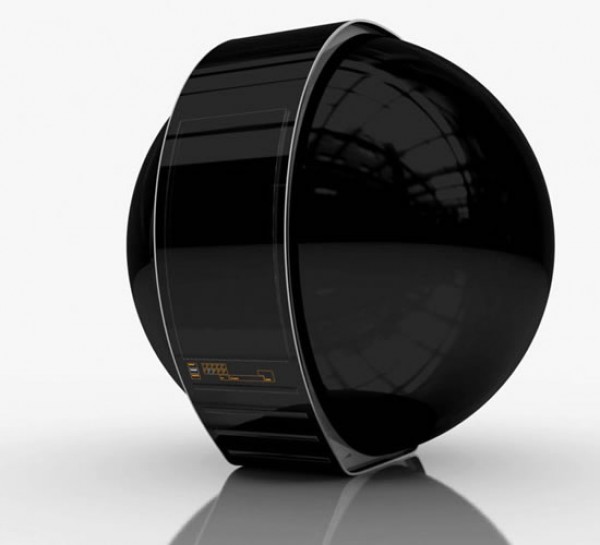
That giant, shiny black hamster-ball up there is the Immersive Cocoon, and geeks, it is a brilliant concept design. Taking all the best features of what used to be fake science and applying them to a room-sized spherical theater… well, it’s indistinguishable from magic, really.
Imagine having a personal Holodeck. Aside from all the pervy implications, there’s serious and appealing usefulness to a room that surrounds its inhabitant in light and sound, can detect their position and movements, and offers an isolated workspace. The designers, Tino Schaedler and design-and-ad firm NAU, predict that the Immersive Cocoon will be installed in airports and malls and available for rent (presumably on an hourly basis) for travelers and business conferencing types.
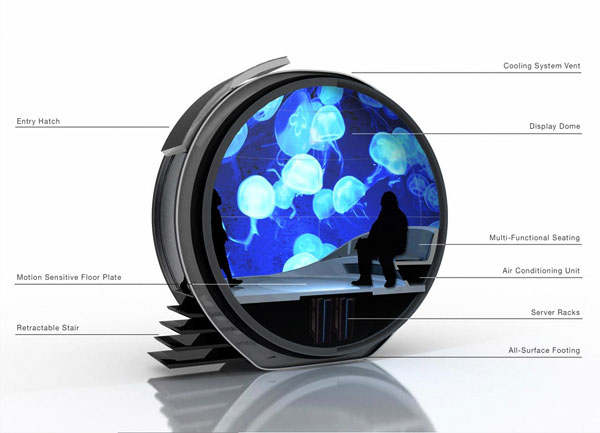
The photo gallery at Dvice shows the Immersive Cocoon’s flexible usability–movies, yoga, gaming, and full-out immersive virtual travel. Check it out and let us know what you think!
[source and images: 1|2] The Immersive Cocoon: Your Very Own Holodeck Via
Labels:
Pc
Commercial Quantum Computers for Sale, Only $10M
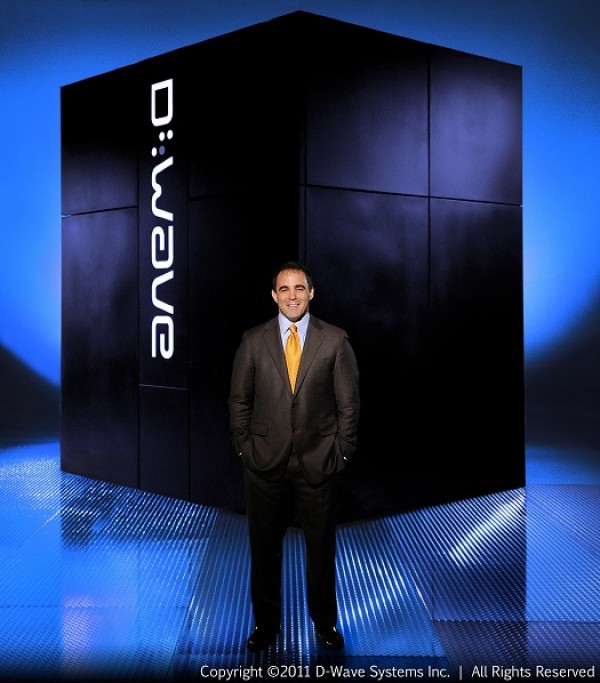
The first D-Wave One, a commercially available 128-qubit quantum computer, has been sold to Lockheed Martin. The agreement between Lockheed Martin and D-Wave Systems was announced this week.
If you have a spare ten million bucks in your sofa cushions, you too can own the D-Wave One. Rather than relying on transistors and classical mechanics, a quantum computer uses principles of quantum mechanics to operate. So, rather than storing bits that read zero or one, quantum computing utilizes qubits, which record both the state of particle entanglement and memory. In the barest of layman’s terms, quantum computing is better, stronger, faster. And now we have the technology.
Predicted functions of quantum computers include code decryption, solving number theory and optimization problems, and modeling complex biological systems. But can it run Crysis?
[Venture Beat][image] Commercial Quantum Computers for Sale, Only $10M Via
Labels:
Pc

Subscribe to:
Posts (Atom)